Friday, 1 March 2013

AVG Antivirus 2013 (With keys)


AVG Antivirus 2013 (With keys)


Hey guys,Today i will provide you the best antivirus according to me, yes AVG internet security 2013 is released by AVG.
Avg 2013 comes with faster, smarter scan and smooth and fast interface. 


Protect your pc with Avg antivirus and feel safe with your browsing.

Download it by clicking on Download now . it is a trial version from the official site but dont worry i will give you the keys which will help you to use it till 2018. oh yes 2018.

Here are the keys,

1) 8MEH-RF3MY-BZ7CJ-9LUAR-ST99N-CEMBR-ACED
2) 8MEH-RGM33-K474L-6FGRR-8RR7K-UEMBR-ACED
3) 8MEH-RJXR4-2CKYP-2GB3A-DBMAD-PEMBR-ACED
4) 8MEH-RMXLW-HN44A-BABPA-S9NQF-PEMBR-ACED
5) 8MEH-RNZLL-2Y4QX-79PPA-MMOKE-AEMBR-ACED
6) 8MEH-RREY3-L2LQA-LUMOR-UDTZ4-6EMBR-ACED
7) 8MEH-RREY3-L2LQA-LUMOR-UJXN3-6EMBR-ACED
8) 8MEH-RW2ZU-29S4F-26QCR-WT482-BEMBR-ACED


Note=Download trial version by clicking Download Now and then use the above keys and enjoy it till 2018.


DOWNLOAD FROM BELOW LINK...THNXX
http://www.avg.com/in-en/homepage

BY JAGS CHOUDHARY (CASPS CHIKHLI) 9898488495

Use Your Facebook In a Whole new Look


Use Your Facebook In a Whole new Look


Hey guys , hope you all are fine. Today we gonna see how to changeyour facebook or use your facebook account in a whole new way.

Yes you can, For this you should have Google chrome browser,Just One chrome extension and everything is changed. As we all know Facebook makes changes time to time, In this post i will show you how to give a brand new and awesome look to your facebook account.


Just Follow these steps to change Facebook layout.


Step 1Click Here And get the 
NewGenBook Desktop extension for your google chrome browser.

Step 2: Now on the right hand side top you will see Add To chrome Button, Click on it and For confirmation click Ok again.

Step3: Wait a few seconts to install the extension to your google chrome browser.

Step 4:Thats it now open Facebook and experience the whole new look of  facebook.


This is how my facebook looks ,Its just a left panel.


This is how my Chat box looks.


If  in case you think you want to switch to earlier layout then just click on Customize and control google chrome button on right side at top of you browser. Then navigate to Tools>extension then disable  NewGenBook Desktop

I hope you will like your brand new look of facebook.
keep visiting,Stay updated.
:)

HOW TO ACCESS BLOCK WEB SITES


How To Access Blocked Web Sites


Hello Friends,

How's You Today, Today we will see How to Access Blocked Web sites.
Specially in School and Colleges, Social networking sites and Youtube are normally blocked.
We have to spend whole day in colleges, Most of the colleges and schools have internet connection but the main problem is that,They block Websites which we Really Want for Entertainment.
So,  today we will see the solution to this problem.


There Are Many Tricks But We Discuss Only Two Tricks Here Which Can Really Helpful For Teenagers And Officers.

1) Through Website IP Address
2) Through Proxy Websites


1) Website IP Address:-
In this Trick we open websites through Ip address of that website. All websites have Thier own Ip address.but now you must be thinking how to get Ip address of websites, no dont worry i will help you out.


Carry out all the below steps to find the Ip address of websites.

Step 1:- Open CMD Through Start program.

Step 2:- Write "ping"  give space and type website name there.For eg : ping www.facebook.com

Step 3:- Then Press Enter.You Can See One Window Like Below.


Step 4: As you can see in the above picture,after doing 3rd step, you get the ip address. now enter that ip address in the address bar in you Browser, press enter. thats it.

Note : Manny a times websites are blocked along with their ip address, so if ip address of the site are also blocked then you can open that particular site.

But here is another trick to access blocked websites even if websites and their ip address are blocked.


2) Proxy Websites:-

In This Trick You can Access any Websites Through Proxy Websites,
Here are some Proxy Websites


Just open these sites, Enter the Url of Blocked website which you want to Access, For Eg: "www.geekofreak.com " then press enter.
Thats it That blocked websites is now Ready for you To access.

That's All

Bonus Tip : The Above 2 tricks will definately worked for you but You can even Use Tor Browser to Surf Anonymously and through that browser you can even open blocked websites.

I believe this article will help you,
 I ask you to plz make use of social plugins, share it, tweet it, Recommend this.
Thanks :)


 BY JAGS  CHOUDHARY(CASPS CHIKHLI)

Monday, 31 December 2012

Is your computer male or female

Is your computer male or female

......


This is funny trick that let you know the gender of your computer whether it is male or female. So let get started.

  • Open Notepad and paste the following codes.
        CreateObject("SAPI.SpVoice").Speak"i love you"
  • Save the file as gender.vbs
  • Now, open the save file
  • If you hear male voice then your computer is male and if you hear female voice then its female.
 

                     by jags choudahry


Keyboard Dancing Led Light Trick

Keyboard Dancing Led Light Trick


Today i will be showing you an interesting trick which will let yourkeyboard led light to dance. Basicly we will be creating a vbscript to make caps lock, num lock and scroll lock to perform this trick. So lets get started.
 
     How to do that ?
       1. Open Notepad and copy below codes into it.
 
 
Set wshShell =wscript.CreateObject("WScript.Shell")
do
wscript.sleep 100
wshshell.sendkeys "{CAPSLOCK}"
wshshell.sendkeys "{NUMLOCK}"
wshshell.sendkeys "{SCROLLLOCK}"
loop
       
       2. Then save this file as led.vbs (.vbs is must)
       3. Open your save file and see your keyboard led blinking like disco lights.
 
 
     How to disable blinking Led ?
 
  1. Goto that notepad file & right click..
  2.  click on edit ,
  3.  remove "do" & "loop" word...
  4. now this is disable..
    thnk you..
                  by jags choudhary


Remove virus from USB Drives.

Remove virus from USB Drives.


Remove virus from USB Drives.

Whenever you plug a USB drive in your system, a window will appear similar to the one shown below
USB....

Don’t click on Ok , just choose ‘Cancel’.

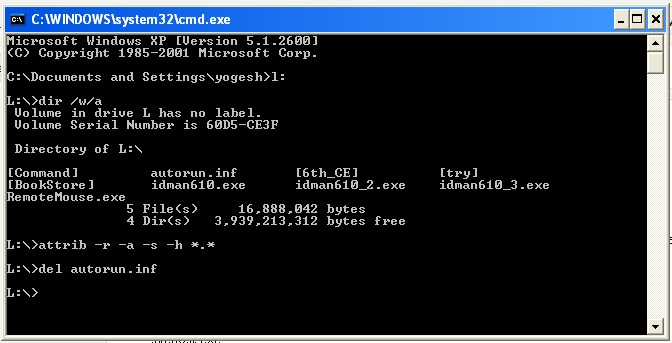
Open the Command Prompt by typing ‘cmd‘ in the run box.
In the command prompt  type the

drive letter:( ex - i,j,k..) and press enter .
Now type dir /w/a and press enter.


This will display a list of the files in the pen drive. Check whether the following files are there or not

    * Autorun.inf
    * Ravmon.exe
    * New Folder.exe
    * svchost.exe
    * Heap41a
    * or any other exe file which may be suspicious.


If any of the above files are there, then probably the USB drive is infected. 
In command prompt type attrib -r -a -s -h *.* and press enter.

This will remove the Read Only, Archive, System and hidden file attribute from all the files.
 Now just delete the files using the command 
del filename. example del Ravmon.exe. 
Delete all the files that are suspicious. 

To be on a safer side, just scan the USB drive with an 
anti virus program to check whether it is free of virus or not...
 

                      by jags choudahry


Airtel tune in C.

Airtel tune in C.


Make a simple notepad file as below.....
#include<dos.h>                                                   
#include<stdio.h> 
float main(void) 
{ 
float A,Bb,D,G,F; 
A = 440; 
G = 780; 
Bb = 461; 
D = 586; 
F = 687; 
sound(G); delay(500); nosound(); 
sound(G); delay(250); nosound(); 
sound(G); delay(500); nosound(); 
sound(2*D); delay(500); nosound();                                          
sound(2*A); delay(250); nosound();
sound(2*Bb); delay(250); nosound();
sound(2*A); delay(250); nosound();
sound(G); delay(250); nosound(); 
sound(F); delay(500); nosound(); 
sound(2*A); delay(500); nosound(); 
sound(G); delay(250); nosound(); 
sound(2*A); delay(250); nosound(); 
sound(G); delay(250); nosound(); 
sound(F); delay(250);
sound(G); delay(250); 
sound(2*A); delay(250); 
sound(2*Bb); delay(500); 
sound(2*A); delay(500); 
sound(G); delay(250); 
sound(F); delay(250); 
sound(D); delay(500); nosound(); 
//end 1 
sound(G); delay(500); nosound(); 
sound(G); delay(250); nosound(); 
sound(G); delay(500); nosound(); 
sound(2*D); delay(500); nosound(); 
sound(2*A); delay(250); nosound(); 
sound(2*Bb); delay(250); nosound(); 
sound(2*A); delay(250); nosound(); 
sound(G); delay(250); nosound(); 
sound(F); delay(500); nosound(); 
sound(2*A); delay(500); nosound(); 
sound(G); delay(250); nosound(); 
sound(2*A); delay(250); nosound(); 
sound(G); delay(250); nosound(); 
sound(F); delay(250); 
sound(G); delay(250); 
sound(2*A); delay(250); 
sound(2*Bb); delay(500); 
sound(2*A); delay(500); 
sound(G); delay(250); 
sound(F); delay(250); 
sound(D); delay(500); nosound(); 
//end 2 
sound(2*A); delay(250); nosound(); 
sound(G); delay(250); nosound(); 
sound(F); delay(250); 
sound(G); delay(250); 
sound(2*A); delay(250); 
sound(2*Bb); delay(500); 
sound(2*A); delay(500); 
sound(G); delay(250);
sound(F); delay(250); 
sound(D); delay(500); nosound(); 
//end 3 
sound(2*A); delay(250); nosound(); 
sound(G); delay(250); nosound(); 
sound(F); delay(250); 
sound(G); delay(250); 
sound(2*A); delay(250); 
sound(2*Bb); delay(500); 
sound(2*A); delay(500); 
sound(G); delay(250); 
sound(F); delay(250); 
sound(D); delay(500); nosound(); 
return 0; 
}

Save it as .C and run in Turob C/ C++ Editor.....& Enjoy the sound tune.


Delete virus from your pen drive.

Delete virus from your pen drive.


1) Disable autorun(autoplay).
2) start>Run.If your pendrive is in e:drive then type
    dir /w/a.
    If there is Autorun.inf,Ravmon.exe,svchost.exe etc...
3)Then open command prompt and type attrib -r -a -s -h *.*
    then del filename.
    for ex,if you want to delete autorun.inf then type del autorun.inf
    Now virus is remove from your pen drive.....


              by jags choudhary
 

How to Speed Up xp.

How to Speed Up xp.


1) Remove spyware and viruses from your hard drives...
     using free antivirus software...(regular scan your PC)
2) Clear History, Remove temporary Internet files.
     Empty the Recycle Bin.Remove Windows temporary files, such as error reports.
     (for that use free software like CCleaner and platinum guard) 
3) Use disk cleanup (Start > All programs > Accessories > System tools > disk cleanup)
4) Set low resolution wallpapers.
5)  Regularly  checking your disk by CHKDSK.
     (right click on My Computer > Properties.click the Tools tab  click on Check Now button.)
     Then start the process for disk checking. 
That are some way to speed up your XP.


Increase your internet surfing speed.

Increase your internet surfing speed.


1) Open gpedit.msc(Start > Run > gpedit.msc)
2) Open Group Policy.
3) Select  { Computer

Configuration > Administrative

Templates
                   > Network > QoS packet Scheduler.}
4) Click Limit Reversible Bandwidth > Select

Enable.
5) Then decrease Bandwidth limit (n%) to 0%.
6)  Press Apply and OK.
     Restart your PC.


Can't format Pen drive?

Can't format Pen drive?


) Right click on My computer > Open Manage.
2) Select Disk management.
3) Right click on disk label (like J: etc..)


4) Change Drive letter and paths.....
5)  Click on Remove.
6) Then format pen drive...
7) After that again Add Drive letter (J:)
    Now your pen drive is safe formatted....


                                  by jags choudhary  
 

Create a shortcut for Locking Computer Screen.

Create a shortcut for Locking Computer Screen.


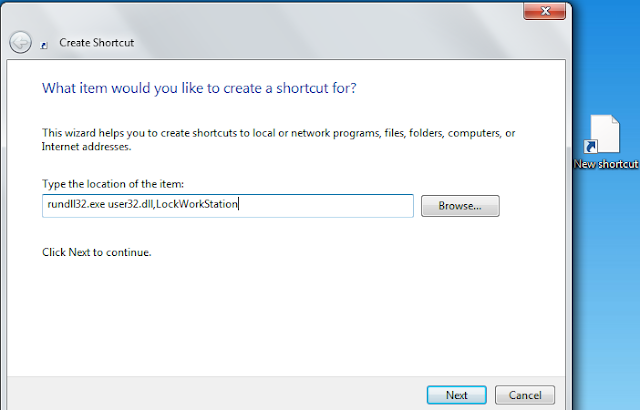
1) Right-click on the desktop where you would like to create the shortcut. 


2) Click on Shortcut from the menu.
3) Then type rundll32.exe user32.dll, LockWorkStation. 
4)  Click on the Next button.
5)  Type in a name for your shortcut.
6) Click on the Finish button..
 Now just Click  on icon whenever you want to lock you Screen... 

   
                                         by jags choudhary
 

Make easy symbol

Try this
ALT+0
ALT+1 ☺
ALT+2 ☻
ALT+3 ♥
ALT+4 ♦
ALT+5 ♣
ALT+6 ♠
ALT+7
ALT+8
ALT+9
ALT+10
ALT+11 ♂
ALT+12 ♀
T+13
ALT+14 ♫
ALT+15 ☼
ALT+16 ►
ALT+17 ◄
ALT+18 ↕
ALT+19 ‼
ALT+20 ¶
ALT+21 §
ALT+22 ▬
ALT+23 ↨
ALT+24 ↑
ALT+25 ↓
ALT+26 →
ALT+27 ←
ALT+28 ∟
ALT+29 ↔
ALT+30 ▲
ALT+31 ▼
ALT+32
ALT+33 !
ALT+34 "
ALT+35 #
ALT+36 $
ALT+37 %
ALT+38 &
ALT+39 '
ALT+40 (
ALT+41 )
ALT+42 *
ALT+43 +
ALT+44 ,
ALT+45 -
ALT+46 .
ALT+47 /
ALT+48 0
ALT+49 1
ALT+50 2
ALT+51 3
ALT+52 4
ALT+53 5
ALT+54 6
ALT+55 7
ALT+56 8
ALT+57 9
ALT+58 :
ALT+59 ;
ALT+60 <
ALT+61 =
ALT+62 >
ALT+63 ?
ALT+64 @
ALT+65 A
ALT+66 B
ALT+67 C
ALT+68 D
ALT+69 E
ALT+70 F
ALT+71 G
ALT+72 H
ALT+73 I
ALT+74 J
ALT+75 K
ALT+76 L
ALT+77 M
ALT+78 N
ALT+79 O
ALT+80 P
ALT+81 Q
ALT+82 R
ALT+83 S
ALT+84 T
ALT+85 U
ALT+86 V
ALT+87 W
ALT+88 X
ALT+89 Y
ALT+90 Z
ALT+91 [
ALT+92 \
ALT+93 ]
ALT+94 ^
ALT+95 _
ALT+96 `
ALT+97 a
ALT+98 b
ALT+99 c
ALT+100 d
ALT+101 e
ALT+102 f
ALT+103 g
ALT+104 h
ALT+105 i
ALT+106 j
ALT+107 k
ALT+108 l
ALT+109 m
ALT+110 n
ALT+111 o
ALT+112 p
ALT+113 q
ALT+114 r
ALT+115 s
ALT+116 t
ALT+117 u
ALT+118 v
ALT+119 w
ALT+120 x
ALT+121 y
ALT+122 z
ALT+123 {
ALT+124 |
ALT+125 }
ALT+126 ~
ALT+127 ⌂
ALT+128 Ç
ALT+129 ü
ALT+130 é
ALT+131 â
ALT+132 ä
ALT+133 à
ALT+134 å
ALT+135 ç
ALT+136 ê
ALT+137 ë
ALT+138 è
ALT+139 ï
ALT+140 î
ALT+141 ì
ALT+142 Ä
ALT+143 Å
ALT+144 É
ALT+145 æ
ALT+146 Æ
ALT+147 ô
ALT+148 ö
ALT+149 ò
ALT+150 û
ALT+151 ù
ALT+152 ÿ
ALT+153 Ö
ALT+154 Ü
ALT+155 ¢
ALT+156 £
ALT+157 ¥
ALT+158 ₧
ALT+159 ƒ
ALT+160 á
ALT+161 í
ALT+162 ó
ALT+163 ú
ALT+164 ñ
ALT+165 Ñ
ALT+166 ª
ALT+167 º
ALT+168 ¿
ALT+169 ⌐
ALT+170 ¬
ALT+171 ½
ALT+172 ¼
ALT+173 ¡
ALT+174 «
ALT+175 »
ALT+176 ░
ALT+177 ▒
ALT+178 ▓
ALT+179 │
ALT+180 ┤
ALT+181 ╡
ALT+182 ╢
ALT+183 ╖
ALT+184 ╕
ALT+185 ╣
ALT+186 ║
ALT+187 ╗
ALT+188 ╝
ALT+189 ╜
ALT+190 ╛
ALT+191 ┐
ALT+192 └
ALT+193 ┴
ALT+194 ┬
ALT+195 ├
ALT+196 ─
ALT+197 ┼
ALT+198 ╞
ALT+199 ╟
ALT+200 ╚
ALT+201 ╔
ALT+202 ╩
ALT+203 ╦
ALT+204 ╠
ALT+205 ═
ALT+206 ╬
ALT+207 ╧
ALT+208 ╨
ALT+209 ╤
ALT+210 ╥
ALT+211 ╙
ALT+212 ╘
ALT+213 ╒
ALT+214 ╓
ALT+215 ╫
ALT+216 ╪
ALT+217 ┘
ALT+218 ┌
ALT+219 █
ALT+220 ▄
ALT+221 ▌
ALT+222 ▐
ALT+223 ▀
ALT+224 α
ALT+225 ß
ALT+226 Γ
ALT+227 π
ALT+228 Σ
ALT+229 σ
ALT+230 µ
ALT+231 τ
ALT+232 Φ
ALT+233 Θ
ALT+234 Ω
ALT+235 δ
ALT+236 ∞
ALT+237 φ
ALT+238 ε
ALT+239 ∩
ALT+240 ≡
ALT+241 ±
ALT+242 ≥
ALT+243 ≤
ALT+244 ⌠
ALT+245 ⌡
ALT+246 ÷
ALT+247 ≈
ALT+248 °
ALT+249 ∙
ALT+250 ·
ALT+251 √
ALT+252 ⁿ
ALT+253 ²
ALT+254 ■
ALT+255
ALT+00
ALT+01 
ALT+02 
ALT+03 
ALT+04 
ALT+05 
ALT+06 
ALT+07
ALT+08 
ALT+09
ALT+010
ALT+011
ALT+012
ALT+013
ALT+014 
ALT+015 
ALT+016 
ALT+017 
ALT+018 
ALT+019 
ALT+020 
ALT+021 
ALT+022 
ALT+023 
ALT+024 
ALT+025 
ALT+026 
ALT+027 
ALT+028 
ALT+029 
ALT+030 
ALT+031 
ALT+032
ALT+033 !
ALT+034 "
ALT+035 #
ALT+036 $
ALT+037 %
ALT+038 &
ALT+039 '
ALT+040 (
ALT+041 )
ALT+042 *
ALT+043 +
ALT+044 ,
ALT+045 -
ALT+046 .
ALT+047 /
ALT+048 0
ALT+049 1
ALT+050 2
ALT+051 3
ALT+052 4
ALT+053 5
ALT+054 6
ALT+055 7
ALT+056 8
ALT+057 9
ALT+058 :
ALT+059 ;
ALT+060 <
ALT+061 =
ALT+062 >
ALT+063 ?
ALT+064 @
ALT+065 A
ALT+066 B
ALT+067 C
ALT+068 D
ALT+069 E
ALT+070 F
ALT+071 G
ALT+072 H
ALT+073 I
ALT+074 J
ALT+075 K
ALT+076 L
ALT+077 M
ALT+078 N
ALT+079 O
ALT+080 P
ALT+081 Q
ALT+082 R
ALT+083 S
ALT+084 T
ALT+085 U
ALT+086 V
ALT+087 W
ALT+088 X
ALT+089 Y
ALT+090 Z
ALT+091 [
ALT+092 \
ALT+093 ]
ALT+094 ^
ALT+095 _
ALT+096 `
ALT+097 a
ALT+098 b
ALT+099 c
ALT+0100 d
ALT+0101 e
ALT+0102 f
ALT+0103 g
ALT+0104 h
ALT+0105 i
ALT+0106 j
ALT+0107 k
ALT+0108 l
ALT+0109 m
ALT+0110 n
ALT+0111 o
ALT+0112 p
ALT+0113 q
ALT+0114 r
ALT+0115 s
ALT+0116 t
ALT+0117 u
ALT+0118 v
ALT+0119 w
ALT+0120 x
ALT+0121 y
ALT+0122 z
ALT+0123 {
ALT+0124 |
ALT+0125 }
ALT+0126 ~
ALT+0127 
ALT+0128 €
ALT+0129 
ALT+0130 ‚
ALT+0131 ƒ
ALT+0132 „
ALT+0133 …
ALT+0134 †
ALT+0135 ‡
ALT+0136 ˆ
ALT+0137 ‰
ALT+0138 Š
ALT+0139 ‹
ALT+0140 Œ
ALT+0141 
ALT+0142 Ž
ALT+0143 
ALT+0144 
ALT+0145 ‘
ALT+0146 '
ALT+0147 "
ALT+0148 "
ALT+0149 •
ALT+0150 –
ALT+0151 —
ALT+0152 ˜
ALT+0153 ™
ALT+0154 š
ALT+0155 ›
ALT+0156 œ
ALT+0157 
ALT+0158 ž
ALT+0159 Ÿ
ALT+0160
ALT+0161 ¡
ALT+0162 ¢
ALT+0163 £
ALT+0164 ¤
ALT+0165 ¥
ALT+0166 ¦
ALT+0167 §
ALT+0168 ¨
ALT+0169 ©
ALT+0170 ª
ALT+0171 «
ALT+0172 ¬
ALT+0173 ­
ALT+0174 ®
ALT+0175 ¯
ALT+0176 °
ALT+0177 ±
ALT+0178 ²
ALT+0179 ³
ALT+0180 ´
ALT+0181 µ
ALT+0182 ¶
ALT+0183 ·
ALT+0184 ¸
ALT+0185 ¹
ALT+0186 º
ALT+0187 »
ALT+0188 ¼
ALT+0189 ½
ALT+0190 ¾
ALT+0191 ¿
ALT+0192 À
ALT+0193 Á
ALT+0194 Â
ALT+0195 Ã
ALT+0196 Ä
ALT+0197 Å
ALT+0198 Æ
ALT+0199 Ç
ALT+0200 È
ALT+0201 É
ALT+0202 Ê
ALT+0203 Ë
ALT+0204 Ì
ALT+0205 Í
ALT+0206 Î
ALT+0207 Ï
ALT+0208 Ð
ALT+0209 Ñ
ALT+0210 Ò
ALT+0211 Ó
ALT+0212 Ô
ALT+0213 Õ
ALT+0214 Ö
ALT+0215 ×
ALT+0216 Ø
ALT+0217 Ù
ALT+0218 Ú
ALT+0219 Û
ALT+0220 Ü
ALT+0221 Ý
ALT+0222 Þ
ALT+0223 ß
ALT+0224 à
ALT+0225 á
ALT+0226 â
ALT+0227 ã
ALT+0228 ä
ALT+0229 å
ALT+0230 æ
ALT+0231 ç
ALT+0232 è
ALT+0233 é
ALT+0234 ê
ALT+0235 ë
ALT+0236 ì
ALT+0237 í
ALT+0238 î
ALT+0239 ï
ALT+0240 ð
ALT+0241 ñ
ALT+0242 ò
ALT+0243 ó
ALT+0244 ô
ALT+0245 õ
ALT+0246 ö
ALT+0247 ÷
ALT+0248 ø
ALT+0249 ù
ALT+0250 ú
ALT+0251 û
ALT+0252 ü
ALT+0253 ý
ALT+0254 þ
ALT+0255 ÿ

Enjoy:)

                                                   by jags